Database DevOps
Treating database deployments with the same automation and rigor as application code
By the SchemaSmith Team · Last reviewed
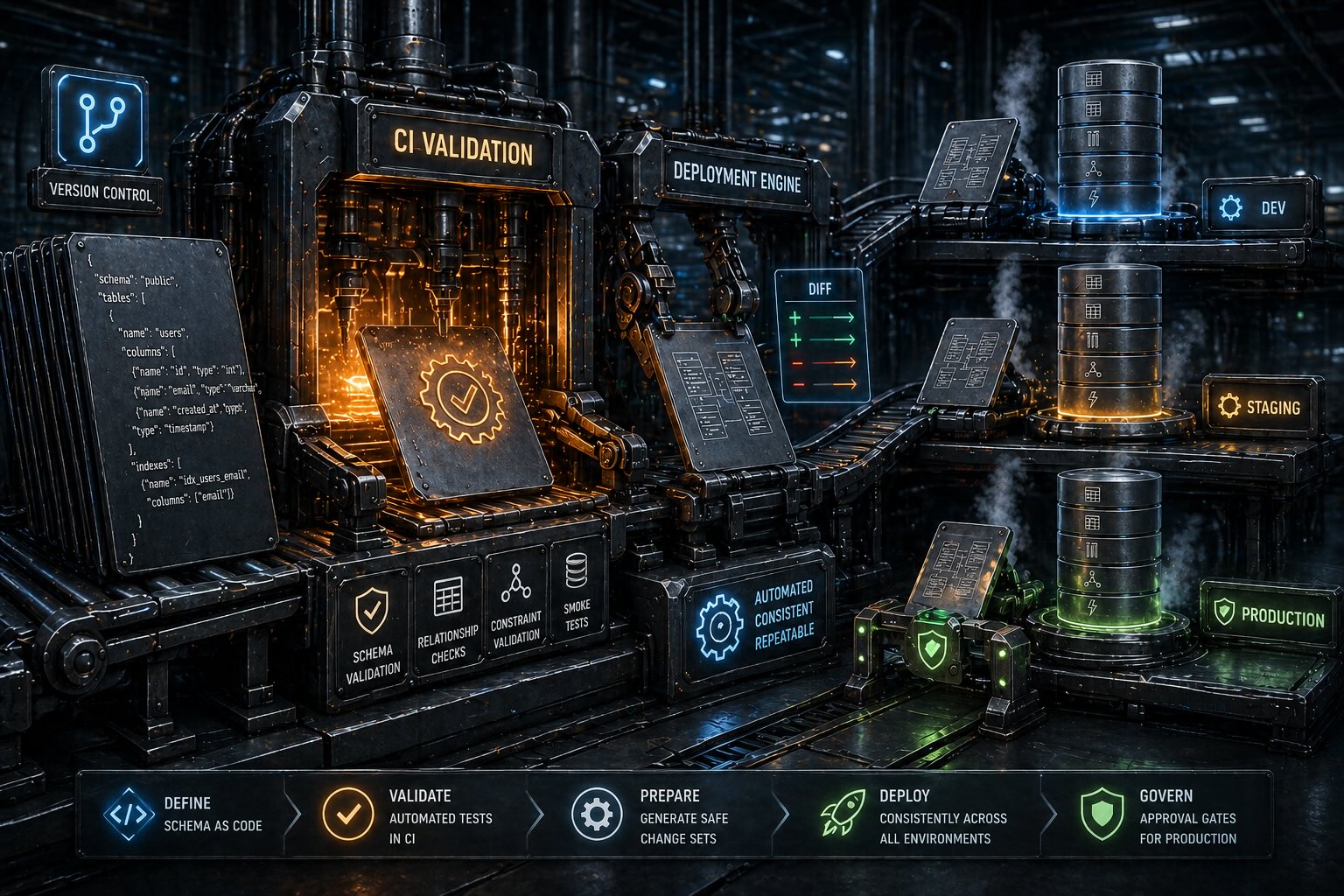
Treating database deployments with the same automation and rigor as application code
By the SchemaSmith Team · Last reviewed
Database DevOps applies the same automation, testing, and deployment practices to database schema changes that teams already use for application code. The goal is to eliminate manual database deployments, catch schema issues in CI before they reach production, and make database changes as routine and safe as shipping a new feature. This requires automated validation in CI, consistent deployment tooling across environments, and approval gates for production changes.
Application code has had CI/CD for decades. Database changes are often still manual.
When databases are excluded from CI/CD, schema changes become the slowest part of any release. Teams avoid making schema changes even when they are needed because the deployment process is painful and risky. Features that require database modifications get delayed or worked around with application-layer hacks that accumulate technical debt.
The result is a two-speed organization: application code ships continuously, but database changes ship quarterly (if at all), in large, risky batches that are harder to test and harder to roll back.
A database DevOps pipeline mirrors the stages teams already use for application code, with validation and gates appropriate for schema changes.
The deployment tool must be identical across all environments. If your CI uses one tool and production uses another, CI is not testing your production deployment.
What to validate in CI before a schema change reaches any real environment.
Does the schema definition parse correctly? Catch typos, missing commas, and invalid data types before the change ever reaches a database.
Can the tool generate a valid migration plan? A dry run reveals missing dependencies, circular references, and ordering problems without touching a real database.
Deploy from scratch to a new, empty database. The greenfield run catches the things incremental deployments mask: forward references that compile against existing objects but fail in dependency order, default values that work on backfilled rows but break on first insert, foreign keys that depend on data that's already there. Run this on every PR so the schema can rebuild itself any time you stand up a new environment.
Reviewers should be able to read the schema diff in plain language: which tables, columns, indexes, and constraints changed, and why. The point of declarative tooling is that the definition itself is the review surface, so the team trusts the tool to generate correct DDL from a clean diff instead of grading hand-written ALTER statements.
Run the deployment twice in sequence. The second run should produce zero changes, confirming that the tool correctly detects the schema is already in the desired state.
If the tool supports rollback, verify the rollback script works by applying the change, rolling back, and confirming the database returns to its previous state.
Every major CI platform supports database schema validation and deployment. The specifics vary, but the pipeline structure is the same.
Schema validation runs as a check on every pull request. On merge to main, a deployment workflow pushes the change through QA, staging, and production using environment protection rules and required reviewers as gates between stages.
Multi-stage pipelines define validation, QA deploy, staging deploy, and production deploy as separate stages. GitLab environments with approval rules control promotion between stages, and environment-specific variables handle connection strings.
Release pipelines with stage gates provide approval workflows between environments. Variable groups store environment-specific configuration, and pre-deployment approvals ensure production changes are reviewed before execution.
Jenkinsfile stages define schema validation, deployment, and test phases. Input steps pause the pipeline for manual approval before production, and credentials management handles database connection secrets across environments.
Build configurations chain schema validation, deployment, and verification into a pipeline. Snapshot dependencies enforce ordering between stages, and build parameters provide environment-specific configuration with full audit logging.
Pipeline stages with approval steps and governance policies control promotion between environments. Built-in rollback triggers can automatically revert schema changes if deployment verification fails, and OPA policies enforce change management rules.
Database changes need their own testing strategy. Application tests alone are not sufficient.
Does the migration apply cleanly? This is the most basic test: run the deployment against a known-state database and confirm it completes without errors.
Does the application still work with the new schema? Run the application's test suite against the updated database to catch broken queries, missing columns, and type mismatches.
Can you revert the change if needed? Apply the migration, then run the rollback procedure and confirm the database returns to its pre-migration state without data loss.
If data is being transformed (column splits, type conversions, backfills), verify the transformation produces correct results by comparing input and output data samples.
Do queries still perform acceptably after the schema change? Index additions, column type changes, and constraint modifications can all affect query plans and execution times.
Are permissions and row-level security policies intact after the migration? New tables need grants, and renamed objects may lose inherited permissions that the application depends on.
SchemaQuench is a CLI tool that runs in any CI pipeline without requiring a GUI or cloud dependency. It accepts the same command-line arguments in GitHub Actions, GitLab CI, Azure DevOps, Jenkins, TeamCity, Harness, or a developer's terminal.
The CI gate is an actual deploy, not a paper preview. Stand up an ephemeral database in the pipeline, apply the package against it, then run the application's integration tests on top. SchemaQuench's idempotent design means a second run produces zero changes. That second-run zero is the convergence proof that the package describes the schema you actually built.
WhatIf is the confidence tool. Run it locally any time you want to see what SchemaQuench plans to do before it does it: a new contributor wanting reassurance, an unusually large diff worth a second look, a production deploy you'd rather rehearse first. It's not a required step and it's not a CI gate. The team trusts SchemaQuench to generate correct DDL from a clean definition diff; WhatIf is there for the times you want to look over its shoulder.
Deployments are idempotent by design. SchemaQuench compares the desired state against the live database and applies only what is needed. The same command runs safely across all environments, eliminating the need for environment-specific deployment scripts or migration ordering logic.
Script tokens parameterize values inside scripts and JSON expression fields: database names, schema names, environment flags, version stamps, and anything else that varies by environment but lives inside the schema package. The same package deploys to every target; per-environment token values come from settings files or environment variables.
Exit codes and structured output integrate with CI pipeline success/failure gates. A non-zero exit code fails the pipeline step, and output can be parsed for deployment summaries, change counts, and error details.
Deploy database changes through the same CI/CD pipeline your application code uses, with validation and approval gates at each stage.
Start the DevOps labEverything from here is organized by database. Choose yours below and keep going.
Free schema-as-code for SQL Server, PostgreSQL, MySQL, and MariaDB.
The source is on GitHub for anyone to read.
Get Started on GitHub