Database as Code
Treating database schemas with the same rigor as application code
By the SchemaSmith Team · Last reviewed
Treating database schemas with the same rigor as application code
By the SchemaSmith Team · Last reviewed
Database as Code means storing database schema definitions in version control and deploying changes through automated pipelines, just like application code. This eliminates manual schema changes, provides full audit trails through commit history, and enables code review for database modifications. The approach works with both state-based and changelog-driven tools, but state-based definitions map most naturally to the "define the desired state" philosophy.
Database as Code is the principle that your database schema should be defined in files, stored in version control, reviewed in pull requests, and deployed through CI/CD pipelines. Every structural change to the database (tables, columns, indexes, constraints, permissions) is treated as a code change with the same review and deployment rigor as any application feature. The approach traces to Martin Fowler and Pramod Sadalage's foundational work on Evolutionary Database Design, which made the case for treating schema change with the same discipline as application code.
This contrasts sharply with traditional approaches: executing DDL statements manually through a SQL client, relying on tribal knowledge about "what the database looks like," or making ad-hoc changes to production during an incident and hoping someone documents it later. These practices work until they don't, and they usually stop working when the team or the number of environments grows beyond what one person can keep in their head.
If you have used Terraform, Pulumi, or CloudFormation, the concept is familiar. Infrastructure as Code applies to servers, networks, and cloud resources. Database as Code applies the same philosophy to the data layer. You declare the desired state of your schema, store that declaration in version control, and let tooling reconcile the live database with the definition. The benefits are identical: reproducibility, auditability, and the ability to review changes before they reach production.
Managing database schemas as code provides the same advantages that version-controlled application code has enjoyed for decades.
Full history of every schema change with commit messages explaining "why," not just "what." You can see exactly how the schema evolved over time and understand the reasoning behind each modification.
Pull requests for database changes, reviewed by DBAs and developers together. This catches mistakes before they reach production and spreads knowledge of schema decisions across the team.
Any environment can be created from the same definitions. Spin up a new staging database, a developer sandbox, or a disaster recovery instance from the exact same source of truth.
Version control history shows who changed what and when, and tools like blame and annotate let you trace each change back to its author and original commit. For teams in regulated industries, this provides a compliance-friendly record of every schema modification without maintaining a separate audit system.
Feature branches can include database changes alongside application code. The schema modification and the code that depends on it travel together, so reviewers see the full picture in one pull request.
Revert to any prior commit to restore a previous schema state. With state-based tooling, rolling back is as simple as deploying an earlier version of the definition files.
Different tools represent schema as code in different ways. The format you choose affects readability, merge behavior, and how naturally it fits into your existing workflow.
| Format | Tools | Pros | Cons |
|---|---|---|---|
| JSON metadata | SchemaSmith | Human-readable, merge-friendly, structured | Verbose for large schemas |
| HCL | Atlas | Terraform-familiar, declarative | Requires learning HCL syntax |
| XML | Liquibase, DACPAC | Widely supported, schema validation | Verbose, hard to read |
| SQL DDL | Flyway, DbUp, Sqitch | Native database language, no abstraction | Manual authoring, merge conflicts |
| ORM models | EF Migrations, Alembic | Tied to application code | Limited to ORM-supported objects |
Each format has trade-offs. JSON and HCL are declarative (you define the desired state), while SQL DDL and ORM migrations are imperative (you define the steps to get there). XML sits somewhere in between depending on the tool. The choice often depends on your team's existing skills and how many non-table objects (stored procedures, triggers, permissions) you need to manage.
Adopting database as code is a process, not a switch you flip. These steps provide a practical path from manual schema management to a fully automated workflow.
Teams adopting database as code often hit the same obstacles. Knowing them upfront makes them easier to avoid.
Migration scripts accumulate over months and years, but nobody knows what the current schema actually looks like. The only way to find out is to run every script in order and hope nothing conflicts. A source of truth (a declarative definition) solves this by always representing the current desired state.
An emergency fix applied directly to production. A quick column addition that "someone will add to the scripts later." These exceptions accumulate and reintroduce drift. The pipeline must be the only path to production, even under time pressure.
Schema changes that work in development may fail in staging or production due to data volume, existing constraints, or permission differences. Always test schema deployments against a representative environment before promoting to production.
Tables and columns get version-controlled, but stored procedures, triggers, views, and permissions are left out. These objects drift silently and cause hard-to-diagnose issues when environments behave differently despite having "the same schema."
Treating database code review as a nice-to-have rather than a requirement. Schema changes deserve the same scrutiny as application code. A missing index or an incorrect data type can cause production issues that are far harder to fix after data has been written.
Deploying schema changes without automated validation in CI. A dry-run catches syntax errors and basic constraint violations, but dependency issues and ordering problems only surface in a real deployment. Running CI against an actual QA database catches these issues early, before the change reaches staging or production.
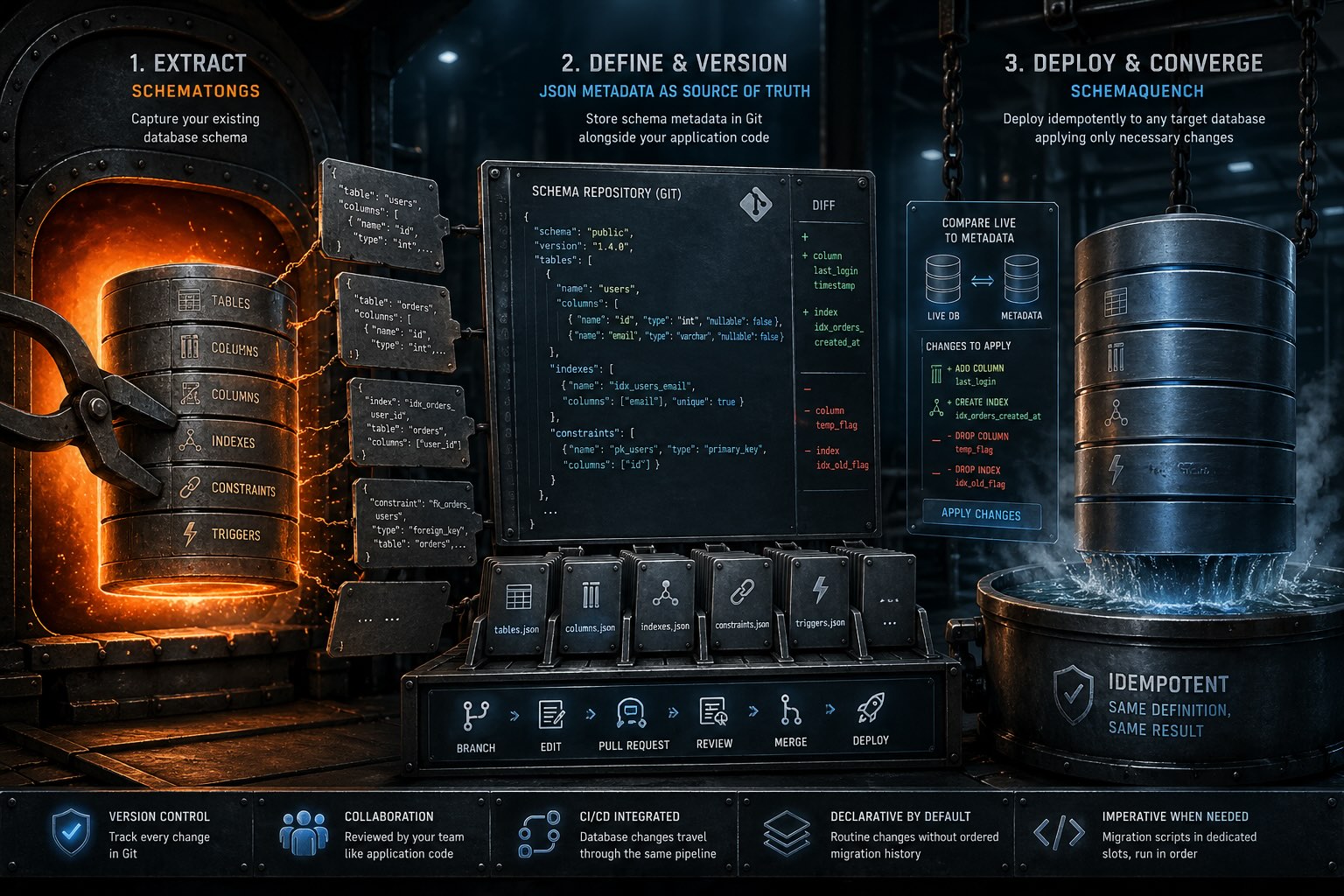
SchemaTongs extracts your existing database into JSON metadata files, giving you a starting point for version control. Rather than manually authoring schema definitions from scratch, you capture what already exists and iterate from there.
The JSON files become your source of truth, stored in source control alongside your application code. Each file describes tables, columns, indexes, constraints, and other schema objects in a structured, human-readable format that produces clean diffs in pull requests.
SchemaQuench deploys from metadata to any target database, comparing the definition against the live schema and generating only the ALTER, CREATE, and DROP statements needed to bring the database in line. This makes deployments idempotent: running the same deployment twice produces the same result.
The entire workflow fits naturally into source-control-based development. Branch, edit metadata files, open a pull request, get it reviewed, merge, and deploy. Database changes travel with application changes, reviewed by the same team, through the same pipeline.
For the routine structural changes that make up most of a schema's life — adding columns, changing types, creating indexes, renaming constraints — the declarative model removes ordered migration history and the risk of scripts running out of order. Genuinely imperative work (data backfills, table splits, one-off cleanups) still has a home: migration scripts live in dedicated slots inside the schema package, run in a defined order, and travel through the same review pipeline as the rest of the definition.
See how managing your schema as code in source control sets up the move from hand-deploys to a repeatable pipeline.
Go laptop to pipelineEverything from here is organized by database. Choose yours below and keep going.
Free schema-as-code for SQL Server, PostgreSQL, MySQL, and MariaDB.
The source is on GitHub for anyone to read.
Get Started on GitHub